
One POS.Every way of working.
Finex POS is a point-of-sale system for cafés, bars and restaurants in Pristina and across Kosovo. Desktop, tablet or both together — it adapts to the way your business works, keeping sales, payments and your team always in sync.
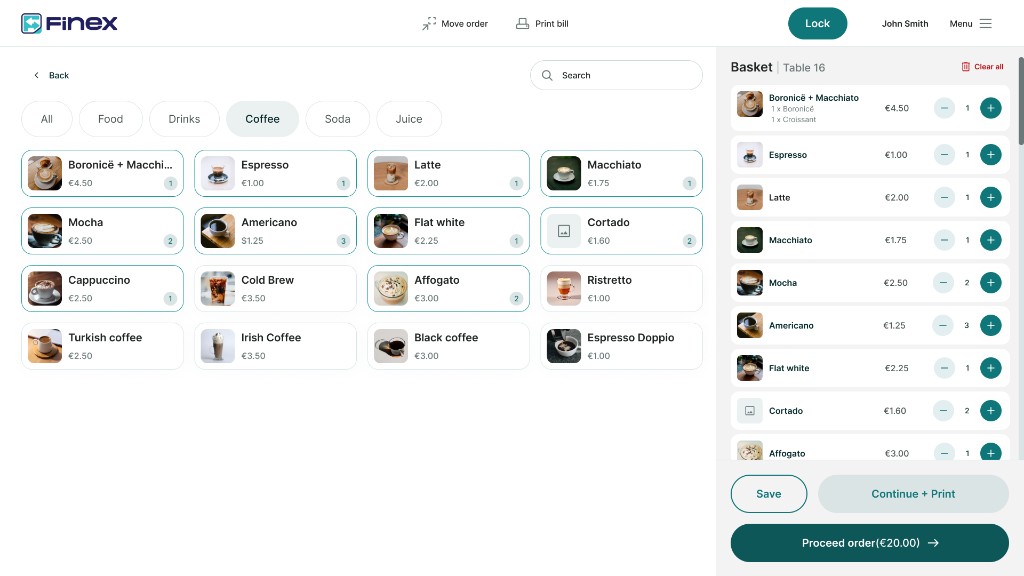
Windows at the till. Android on the floor.
Run Finex on your main terminal and your staff’s tablets at the same time. Tables, orders and changes appear instantly on every device.
- Windows POS
- Android tablet
- Shared live state
Service starts on the floor.
The visual floor plan mirrors how your venue is really laid out. Staff open a table, see its status, the number of guests, and carry on the order with a single tap.
From the table, straight to the kitchen.
Orders are sent automatically to the right station, with their modifiers, notes and courses. Even when several devices are working the same table, each order prints only once.
- 2× Espresso
- 1× Latte— qumësht tërshëre
- Kursi 21× Macchiato— pak sheqer
Payments without friction.
Split the bill by item or by amount, combine several payment methods, and carry on with partial payments without ever losing the state of the bill.
From payment to the Z-report.
Finex manages fiscalisation from start to finish. The fiscal receipt is issued during payment, every transaction stores its fiscal reference, and the Z-report is generated automatically at close of day.
- Shitjet
- €1,240
- Cash
- €680
- Kartelë
- €560
- TVSH
- €189
Windows. Android. One system.
Use Finex on the main terminal, on your staff’s tablets, or on both at once. Every device works together on the same platform.
A single terminal at the till.
A main till with tablets across the floor.
Fully mobile service, tablets only.
The internet can stop. Service doesn’t.
Even when the connection drops, Finex keeps taking orders, payments and prints. When the internet returns, everything syncs automatically — with no staff intervention.
- Encrypted local storage
- Orders and payments saved automatically
- Automatic sync when the network returns
- Automatic print recovery
Hospitality and retail. One platform.
Finex doesn’t force the same workflow on every business. The platform gives hospitality and retail their own dedicated features and experience, so each business works its own way.
Hospitality
Retail
Try Finex in your business.
Book a personalised demo and see how Finex POS adapts to the devices, the team and the workflow of your business.